Meta Ad Library Is Lying to You: 240 Ads vs 1 for the Same Business (2026)
Same business, same day: the keyword search returned a wall of strangers' ads and the Page ID method returned the truth. Tested live, August 2026.
If you have ever typed a business name into the Meta Ad Library to see what a competitor is spending on, and scrolled through a wall of ads that had nothing to do with them, the tool was not broken and you were not searching wrong. You were using the search box, and the search box is not built to answer the question you were asking.
Checking what a business is really spending on ads is part of every audit I run, so I hit this problem constantly. Here is the test I ran this week, the fix, and the method that replaces it.
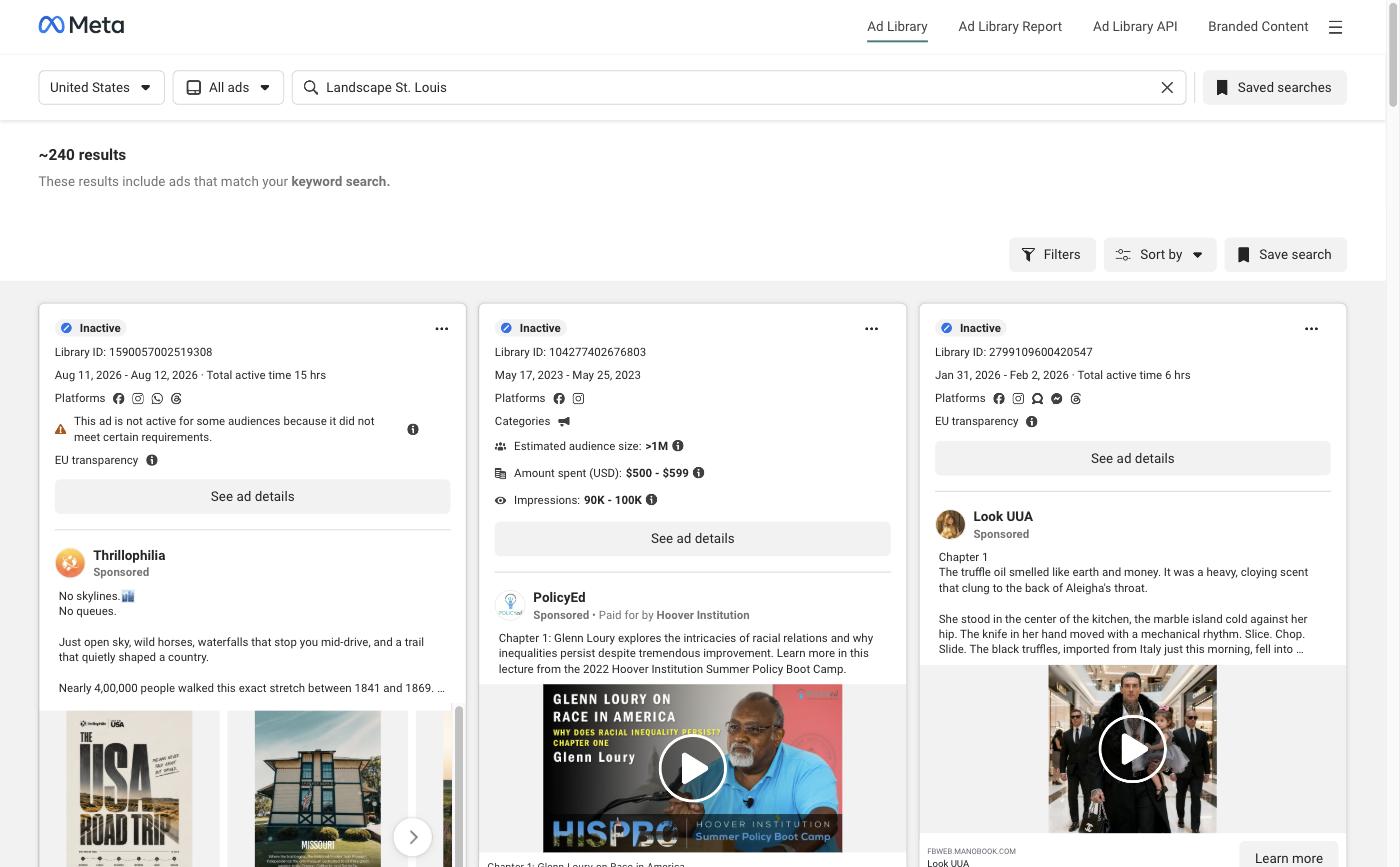
The result up front: searching "Landscape St. Louis" by keyword returned about 240 ads, the top one from an Indian travel company selling a 13-day American road trip priced in rupees. Searching the same business by its Page ID returned exactly one ad, theirs, active since July 6.
The short answer
The Meta Ad Library keyword search matches ad text, not advertisers, so a common business name returns hundreds of unrelated ads that happen to use those words. To see what a competitor or any specific business is running, find their Facebook Page ID and load the Ad Library scoped to that page. It returns only their ads, with no false matches.
Why does Meta Ad Library keyword search return the wrong ads?
Because it searches the words inside ads, not the businesses running them. Type a business name into that box and you are asking for every ad in the country whose copy happens to contain those words.
For a business with an unusual name, that mostly works. For a business named after what it does and where it does it, which is most local businesses, it fails completely. "Landscape," "St. Louis," "dental," "roofing," "auto," and "family" appear in tens of thousands of ads that have nothing to do with the company you are researching.
The tool is doing exactly what it says. "Search by keyword or advertiser" is right there in the box. Most people read it as advertiser search and get keyword search, because keyword is the default behavior and the distinction is never explained.
The cost is a wrong conclusion, which is worse than getting nothing, because you walk away believing something false.
The test, run live
I ran both methods against the same business on the same day, August 2026.
Business: Landscape St. Louis, an established local landscaping company.
Method A, keyword search. Query "Landscape St. Louis," all ad types, all statuses, United States.
Result: approximately 240 ads.
The top-ranked result was an ad from Thrillophilia, a travel company, promoting a 13-day American road trip with pricing in Indian rupees. It matched because the copy contains the word "landscapes." Nothing about it is related to a landscaper, to St. Louis, or to anyone's competitor set.
Scrolling that list would tell you a St. Louis landscaper is running an aggressive multi-market campaign. It would be entirely false.
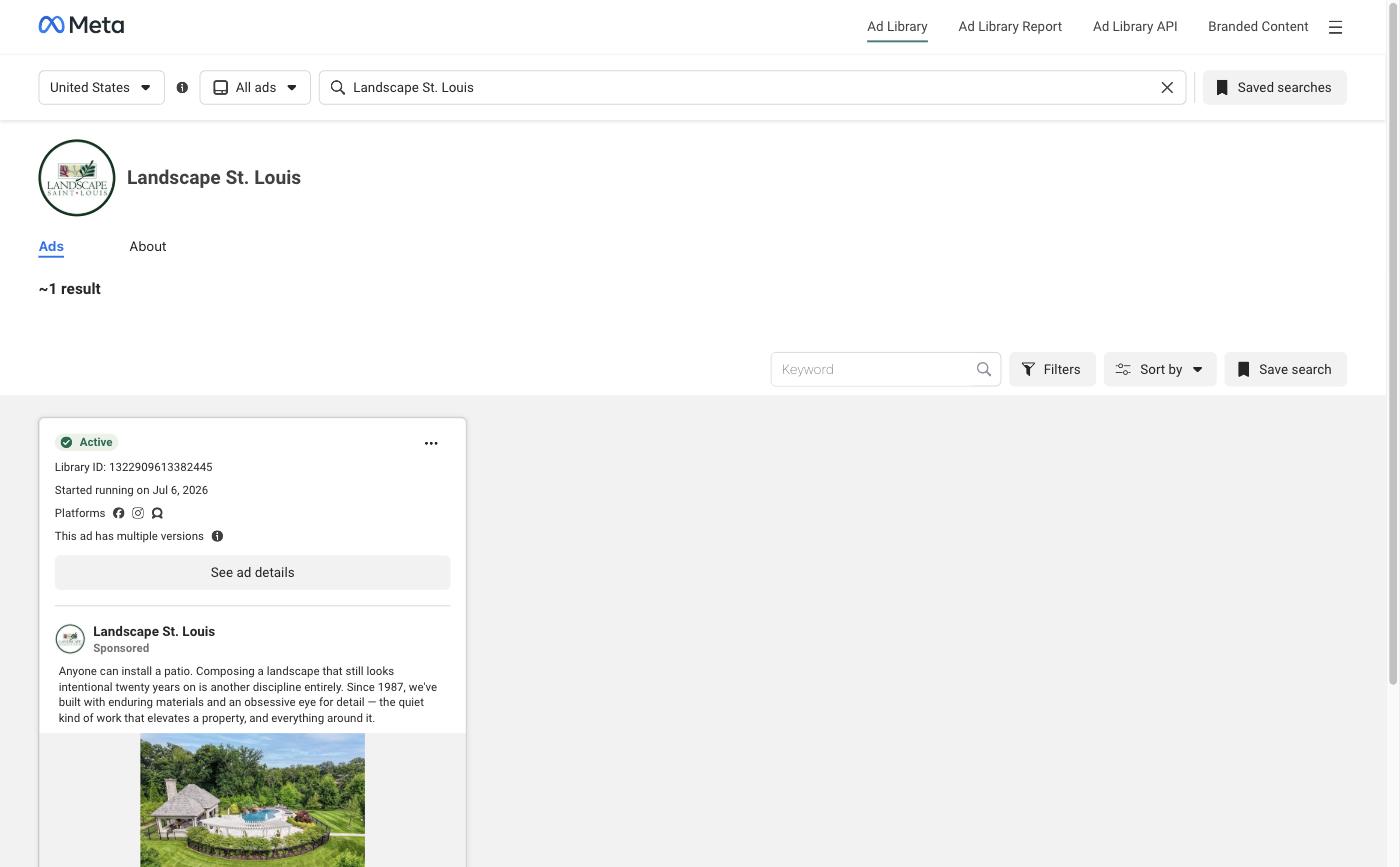
Method B, Page ID. Same business, same tool, same minute. I pulled their Facebook Page ID, 157674667595319, and loaded the Ad Library scoped to that page.
Result: approximately 1 ad. The advertiser name rendered on the page as "Landscape St. Louis." One active ad, running since July 6, 2026, with multiple versions.
| Method | Results | Correct? |
|---|---|---|
| Keyword search | ~240 | No |
| Page ID | ~1 | Yes |
Same tool, same business, same day. One number is a fact and the other is an artifact of a search box.
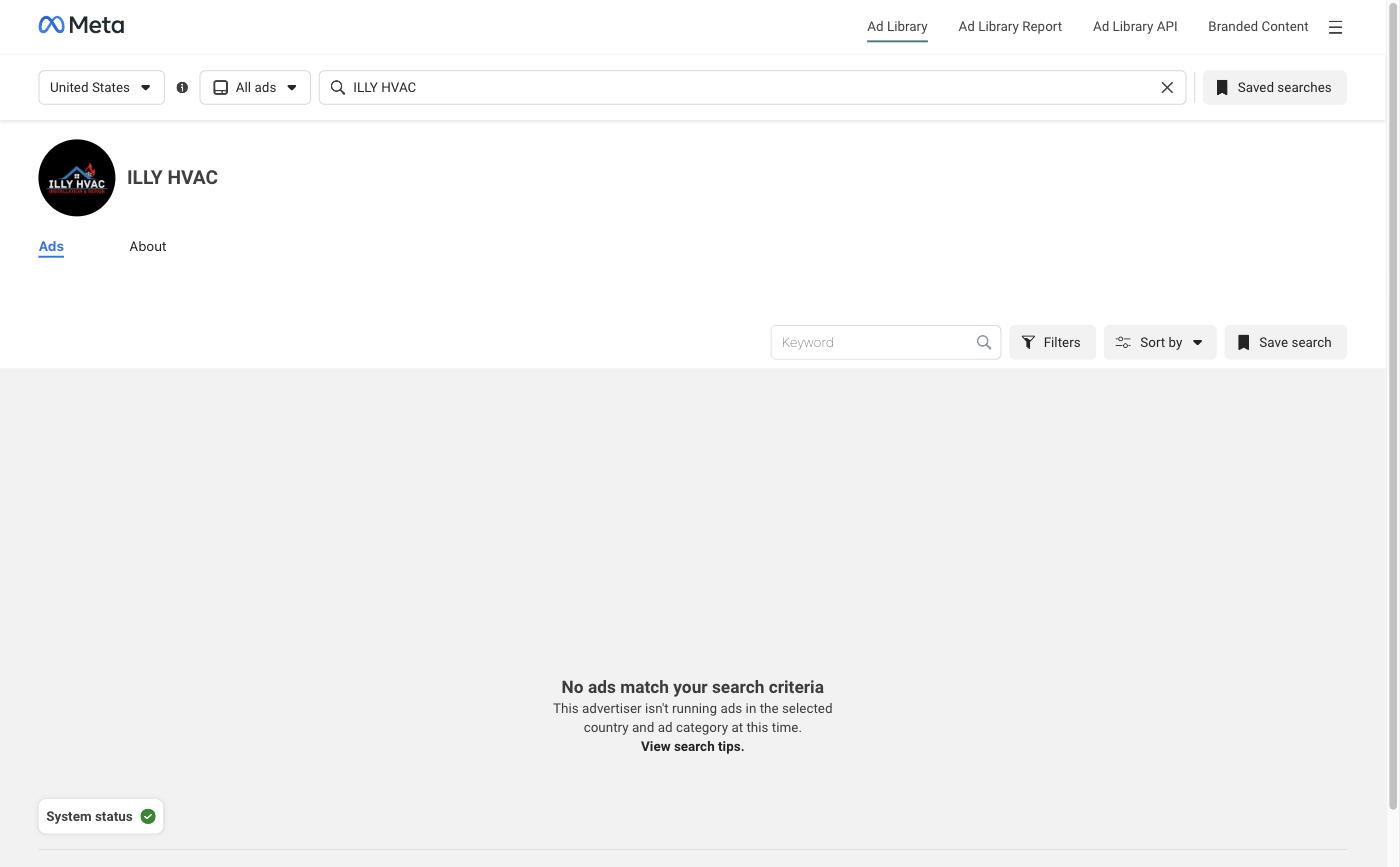
For a second data point in the other direction, I ran the Page ID method on ILLY HVAC in St. Charles, Page ID 457318591447527. The Ad Library returned a clean, unambiguous answer: this advertiser is not running ads in the selected country and ad category. That is a real finding, stated definitively, in one view. Keyword search cannot produce that answer for you, because an empty keyword result and a business that does not advertise look identical.
That settles which method to trust. The next problem is the input it needs, the Page ID, which Facebook stopped showing you years ago.
How do you find a business's Facebook Page ID?
It is embedded in the page's own source code, and you do not need developer tools to get it.
The no-tools method:
- Open the business's Facebook page in your browser.
- Add
view-source:to the front of the URL and reload, so it readsview-source:https://www.facebook.com/theirpage. - Press Ctrl+F (Cmd+F on Mac) and search for
delegate_page. - Do not take the first hit. Look for the occurrence where the business's own name sits next to the number, in the form
"delegate_page":{"id":"157674667595319","category_name":"Landscape Company","name":"Landscape St. Louis". That one confirms itself, which none of the others do.

If Ctrl+F returns 0 of 0, you are on the rendered page, not the source. Check that the URL still starts with view-source:. Find-in-page on a normal Facebook page searches the visible words only, and this string is never visible.
Three traps, and the third one is the expensive one.
It appears many times. On the page I tested, delegate_page matched 14 times. Six of those carry the real Page ID and they all agree. The rest are noise.
Two IDs sit side by side. One occurrence reads "delegate_page":{"is_business_page_active":false,"id":"157674667595319"},"id":"100063533680607". Both are numbers, both follow the string you searched for, and only the first is the Page ID. "The number immediately after it" is not a safe instruction, which is why step 4 above tells you to find the one with the name attached.
delegate_page_id is a different key. Searching for delegate_page also hits delegate_page_id, which is not the page you are looking at. On a logged-in browser those entries hold the IDs of pages you administer, sitting in your own profile-switcher data. Copy one of those and you will scope the Ad Library to yourself, see no ads, and conclude a competitor is not advertising. That is the exact wrong "no" this method exists to prevent, and step 3 of the four-step method below is what catches it.
The one-line method, if you are comfortable opening the browser console. This one returns every distinct ID it can find, so disagreement is visible instead of hidden:
[...new Set([...document.documentElement.innerHTML
      .matchAll(/"delegate_page":\{[^}]*?"id":"(\d+)"/g)].map(m => m[1]))]
One value in the array means you are confident. More than one, or none, means stop and use the Ad Library typeahead fallback below.
A note on that pattern, because a simpler one is tempting and it is brittle. Requiring the ID to come immediately after the brace, as /"delegate_page":\{"id":"(\d+)"/ does, only matches some of the occurrences: Facebook writes the key in more than one order, and on the page I tested three of the six useful hits put is_business_page_active first. The version above accepts either order. It also cannot match delegate_page_id, because it requires the ":{ that only the real key has.
One more detail worth knowing, because the obvious alternatives do not work. Searching that same source for pageID or page_id returns nothing on a current Facebook page. I tested both on two different business pages and only delegate_page matched. Use that exact string.
Fetching the page with a script instead of loading it in a browser does not work either. The same URL fetched programmatically came back with one useless delegate_page_id and no Page ID at all. Facebook serves different HTML to a real navigation than it does to a background request, so this check has to happen in a browser tab.
If the page source method fails, there is a reliable fallback. Type the exact business name into the Ad Library's own search box and watch the typeahead dropdown. Selecting the advertiser from that dropdown, rather than pressing enter, resolves the page for you and loads the scoped view. Pressing enter runs the keyword search and puts you back in the 240-result problem.
ID in hand, the rest is one URL and one discipline.
The four-step method
- Get the Page ID from the business's Facebook page, using either method above.
- Load the scoped Ad Library URL, substituting the ID at the end:
https://www.facebook.com/ads/library/?active_status=all&ad_type=all&country=US&view_all_page_id=PAGE_ID_HERE&media_type=allThe parameters matter. active_status=all includes ads that have stopped running, which is how you see spending history rather than just today. ad_type=all catches political and issue ads that are otherwise filtered out.
- Confirm the advertiser name renders on the results view before you record anything. This is the step people skip and it is the one that prevents a wrong Page ID from producing a confident wrong answer. If the name at the top of the results does not match the business you are researching, stop, because you have the wrong ID.
- Read the result as one of three states. Never force it into two.
How do you read the result?
There are three honest answers, and most people only ever use two.
Running. Ads are returned. Record how many, when the earliest one started, which platforms they run on, and where the ad's button sends people. Where that button goes matters more than the ad copy does.
None found. The scoped view explicitly reports that the advertiser is not running ads in the selected country and category. This is a real finding, not a failure to find one, and it only counts when the advertiser name rendered correctly in step 3.
Inconclusive. You could not confirm the Page ID, the business runs multiple pages, or the advertiser name on the results view did not match. Say inconclusive. Do not round it to "they are not advertising." A wrong "no" is how you end up telling a business owner something about their own company that they know to be false, which ends the conversation in the first thirty seconds.
Why this matters if an agency is pitching you
Because this check takes about ninety seconds, and whether someone ran it tells you what kind of research is behind everything else they are about to claim.
Anyone can pull up a keyword search, screenshot a wall of ads, and tell you your competitors are outspending you. The screenshot is real. The conclusion is invented. I have seen pitches built on exactly that, and the person delivering them usually does not know it is wrong.
There is a more useful reason to run it, though, and it is the finding I care about most when I audit a business.
When the Page ID method shows a business is running ads, the next question is where those ads send people, and whether anything on the other end can tell the owner which ad produced a customer. In most local businesses I check, the answer is nothing. Money is moving, the ads are live, and nobody can name the one that paid for itself. What that leak costs over a year is its own article.
That is not a Meta Ad Library problem. But the Ad Library is where you find out the money is being spent, and the Page ID method is the only way to find out truthfully.
Ninety seconds, and you get one number instead of 240.
The checklist our paid audit runs is published in full. All 160 checks, website to AI readability, free, no email, no gate. Run them on your own business, or have us run them and write the plan: The Blueprint.
Frequently asked questions
Why does Meta Ad Library keyword search return the wrong ads?
Because it searches the words inside ads, not the businesses running them. Typing a business name into that box asks for every ad in the country whose copy happens to contain those words. Searching "Landscape St. Louis" returned about 240 ads, the top one from an Indian travel company selling a road trip priced in rupees.
How do you find a business's Facebook Page ID?
It is in the page's own source code. Open the Facebook page, add view-source: to the front of the URL, and search the source for delegate_page. No developer tools required. If find-in-page returns 0 of 0, you are on the rendered page rather than the source.
What does it mean if the Ad Library shows no ads for a business?
There are three honest answers, and most people only use two. Running means ads came back. None found means the scoped view explicitly reported no ads, which is a real finding and only counts when the advertiser name rendered correctly. Inconclusive means you could not confirm the Page ID. Never round inconclusive to "they are not advertising."
Is there a trap in the Page ID method?
Yes, and it is expensive. delegate_page_id is a different key holding the logged-in user's own page IDs. Grab the wrong one and you scope the Ad Library to yourself, then conclude a competitor is not advertising when they are.
What if the page source method fails?
Type the exact business name into the Ad Library's own search box and select the advertiser from the typeahead dropdown rather than pressing enter. Selecting resolves the page for you. Pressing enter runs the keyword search and puts you back in the 240-result problem.
Method
Tested: August 2026, United States, all ad types, all statuses, in a standard browser.
Business A: Landscape St. Louis, Page ID 157674667595319. Keyword query "Landscape St. Louis" returned approximately 240 results; the top-ranked result was an unrelated travel advertiser. The page-scoped view for the same business returned approximately 1 result, with the advertiser name confirmed on the view, active since July 6, 2026.
Business B: ILLY HVAC, St. Charles, Page ID 457318591447527. Page-scoped view returned an explicit no-ads state with the advertiser name confirmed.
Regex verification: on both Facebook pages, "delegate_page" matched while "pageID":"..." and "page_id":"..." returned nothing. Re-run in full on 29 August 2026 against facebook.com/LandscapeStLouis: the string delegate_page occurred 14 times. Six occurrences carried the Page ID and all six returned the same value, 157674667595319, under the order-tolerant pattern in the article. The stricter pattern requiring "id" immediately after the brace matched only a subset, because Facebook writes the key in more than one order. The remaining occurrences were delegate_page_id entries belonging to pages administered by the logged-in account, plus two bare string references carrying no ID. The same URL retrieved by background fetch rather than browser navigation returned different HTML containing no Page ID.
Screenshots: captured 29 August 2026 from a logged-in browser. Figures in them match the figures in this article, re-confirmed on the same date.
Limits: result counts are Meta's own approximations and shift over time as ads start and stop. A business running several Facebook pages will need each page checked separately. Ad Library coverage varies by country; all figures here are United States.